
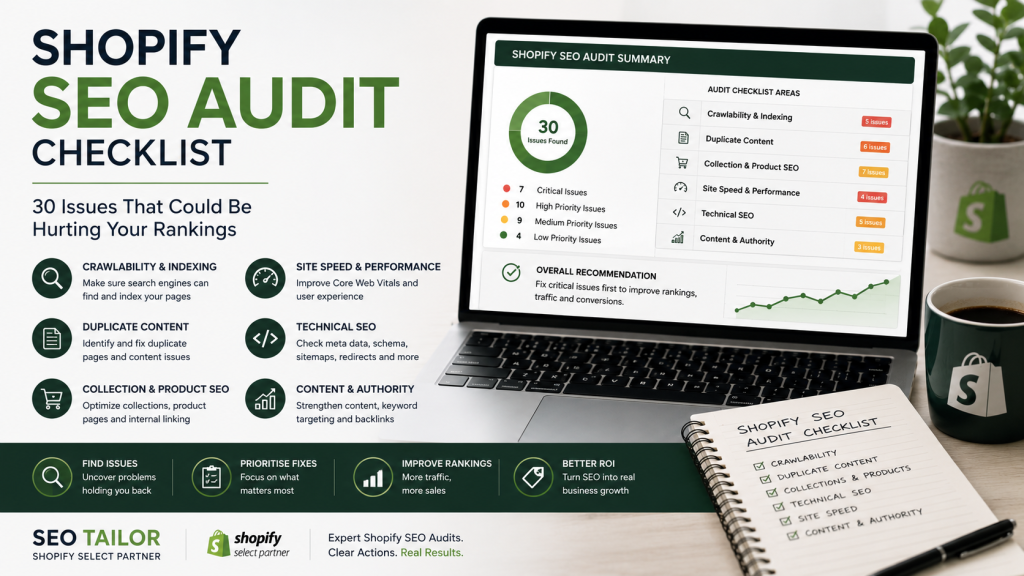
Quick answer: A Shopify SEO audit is a systematic review of the technical, structural, and content factors affecting your store’s organic search performance. It covers crawlability, duplicate content, collection and product page quality, theme performance, and content authority — not just metadata. Identifying issues is the first step; prioritising them correctly is where most DIY audits fall short.
Meta titles get most of the attention in ecommerce SEO conversations, but they account for a fraction of what determines where your Shopify store appears in search results. The issues that most commonly suppress organic rankings are structural and technical — duplicate content paths, misconfigured canonical tags, collection pages with no keyword targeting, and theme code that prevents search engines from crawling important content efficiently.
A proper Shopify SEO audit investigates all of this. It maps how development decisions, content quality, and site architecture interact — and identifies where those interactions are creating problems. This checklist covers 30 specific issues across six audit categories that are worth examining in any Shopify store.
Shopify Indexing and Crawlability Checks
These checks confirm that search engines can find and access your store’s important content, and that they are not wasting crawl budget on pages that should not be indexed.
- Important pages are indexed. Check your key collection pages, product pages, and core landing pages in Google Search Console’s Coverage report. Pages that should be indexed but are not represent immediate lost visibility.
- Test and staging pages are excluded. Any development, staging, or test content accessible via a URL must be blocked from indexation. Password-protecting staging environments is the cleanest solution.
- XML sitemap is accessible and accurate. Shopify generates a sitemap automatically. Verify it is submitted in Search Console, that it is returning a 200 status, and that it contains only indexable URLs.
- robots.txt is not blocking important content. Since Shopify 2.0 made robots.txt editable, incorrect configurations can prevent search engines from accessing collections, products, or other key pages.
- Internal search result pages are handled. Shopify’s internal search generates
?q=parameter URLs that, if indexed, create thin content at scale. These should be blocked. - Broken pages (404s) are identified and resolved. Use Search Console’s Coverage report and a crawl tool to identify 404 errors, particularly those on URLs with backlinks or historical traffic.
- Redirect chains are removed. Multiple sequential redirects (A → B → C) waste crawl budget and dilute link equity. Each redirect should resolve directly to the final destination.
Shopify Duplicate Content Checks
Shopify’s architecture creates duplication risks that do not exist on other platforms. These checks address the most common sources.
- Canonical tags are correctly implemented. Verify that product pages accessed via collection paths (e.g.,
/collections/shoes/products/item) carry a canonical tag pointing to the clean product URL (e.g.,/products/item). This is Shopify’s default behaviour, but it can be broken by theme changes or app conflicts. - Collection-product URL duplication is managed. Confirm that the
/collections/collection-name/products/product-handleURL format is not being indexed alongside the canonical product URL, creating competing versions of the same page. - Duplicate product descriptions are replaced. Using manufacturer-supplied descriptions verbatim across multiple products — or across multiple stores — creates duplicate content that limits how well individual product pages can rank.
- Tag pages are reviewed. Shopify generates tag-filtered collection URLs (e.g.,
/collections/shoes/boots) that can create large volumes of thin pages if left unmanaged. Decide whether these pages should be indexed, noindexed, or blocked. - Filter combinations are controlled. Faceted navigation (filtering by size, colour, or material) generates URL variants at scale. Confirm these are handled consistently — either blocked via robots.txt, noindexed, or canonicalised to the parent collection.
- Pagination is implemented correctly. If your collections span multiple pages, confirm that paginated URLs are crawlable and that the relationship between pages is clear to search engines.
Collection Page SEO Checks
Collection pages are the commercial backbone of most Shopify stores. These checks assess whether they are set up to rank for the category-level queries that drive qualified traffic.
- Each collection targets a distinct topic. If two or more collections are competing for the same keyword, neither will rank well. Confirm that each collection has a clearly defined, non-overlapping keyword focus.
- H1 headings are descriptive. The H1 on each collection page should reflect the primary keyword target clearly and naturally. Generic or brand-only headings miss the opportunity to signal topical relevance.
- Collection copy satisfies search intent. A collection page with no introductory text gives search engines little to assess beyond product titles. Adding useful, keyword-relevant copy — even two or three well-written paragraphs — meaningfully improves ranking potential.
- Products are logically grouped. Collections that mix unrelated products confuse both users and search engines. Confirm that product groupings are coherent and consistent with the collection’s keyword target.
- Internal links support priority collections. High-priority collection pages should receive internal links from other collections, blog posts, and the homepage. Pages with few or no internal links receive less crawl attention and authority.
- Metadata is unique. Every collection should have a distinct page title and meta description. Duplicate or templated metadata across collections reduces click-through rates and signals low effort to search engines.
Product Page SEO Checks
- Product names reflect real searches. Product titles that use internal naming conventions rather than customer-facing search language miss keyword opportunities. Titles should reflect how customers actually search for the product.
- Descriptions are unique. Each product description should be written specifically for that product. Thin or duplicate descriptions limit how well product pages can rank for long-tail queries.
- Images have useful alt text. Alt text should describe the image accurately and, where natural, include relevant keywords. Blank or generic alt text (e.g., “image1.jpg”) misses both SEO and accessibility value.
- Product schema is valid. Use Google’s Rich Results Test to confirm that product schema — including price, availability, and review data — is correctly implemented and eligible for rich results in Google Search.
- Reviews are crawlable. If your store uses a review app, confirm that review content is rendered in HTML rather than loaded entirely via JavaScript. Crawlable reviews add unique content to product pages and support long-tail keyword coverage.
- Related products support internal linking. Related product recommendations provide internal links that improve crawl depth and encourage users to explore more of the store. Confirm these are relevant and functional.
Shopify Theme and Performance Checks
- Apps are not loading unnecessary scripts. Every app that adds JavaScript to your storefront affects page load time. Audit your installed apps and remove any that are inactive or whose functionality duplicates another app. Unnecessary scripts are one of the most common causes of poor Core Web Vitals scores on Shopify stores.
- Images are appropriately sized. Oversized images are a leading cause of slow Largest Contentful Paint (LCP) scores. Confirm that images are compressed, served in modern formats (such as WebP), and sized appropriately for the device rendering them.
- JavaScript is not blocking important content. Theme scripts that render key content — product titles, collection headings, or navigation — via JavaScript can delay how quickly search engines access that content. Test using Google’s URL Inspection tool.
- Mobile layouts work correctly. The majority of ecommerce traffic arrives via mobile. Review key templates on multiple screen sizes to confirm that content, navigation, and calls to action are accessible and functional.
- Core Web Vitals are monitored. LCP, Cumulative Layout Shift (CLS), and Interaction to Next Paint (INP) are confirmed Google ranking signals. Review scores in Search Console’s Core Web Vitals report and address any pages flagged as needing improvement.
Content and Authority Checks
Technical and structural improvements create the foundation for ranking — but content quality and authority determine how far pages can progress in competitive search results.
Additional areas to review as part of a thorough Shopify SEO audit:
- Topical gaps — are there product categories or customer questions your store’s content does not address? Gaps in coverage limit topical authority across the site.
- Thin blog posts — short blog posts with no substantive content dilute the site’s content quality signals. Review existing posts and consolidate or expand those that underperform.
- Orphan content — pages with no internal links pointing to them receive limited crawl attention. Identify orphan pages and integrate them into the site’s linking structure.
- Weak internal linking — beyond navigation menus, in-content links between related collections, products, and blog posts distribute authority and improve crawl depth. Review whether these links exist and whether they are targeted at the right destination pages.
- Missing buying guides — category-level guides that help customers make purchasing decisions support collection page rankings and capture research-phase search traffic. Identify opportunities where guides are absent.
- Backlink quality — a strong backlink profile accelerates rankings. Review existing backlinks for low-quality or spammy links, and identify competitor backlink sources that represent acquisition opportunities.
- Brand trust signals — reviews, press mentions, social proof, and clear business information all contribute to how search engines assess a site’s credibility. Review whether these signals are visible and up to date.
How to Prioritise Shopify SEO Problems
A Shopify SEO audit rarely produces a short list. The practical challenge is knowing where to start. A simple prioritisation model prevents teams from spending time on low-impact fixes while critical issues go unresolved.
| Priority | Description | Examples |
|---|---|---|
| Critical | Prevents crawling, indexing, or purchase completion | robots.txt blocking collections, checkout errors, key pages returning 404 |
| High | Directly affects ranking or conversion on priority pages | Missing canonical tags, no collection copy, broken redirects for high-traffic pages |
| Medium | Affects supporting or secondary pages | Thin product descriptions, missing alt text, weak internal linking on blog content |
| Low | Cosmetic or minor optimisation | Metadata character length, minor image sizing adjustments, tag page tidying |
Work through critical issues first. Address high-priority items next. Medium and low-priority fixes can be scheduled into an ongoing improvement programme.
DIY Audit vs Professional Shopify SEO Audit
Free and paid tools — Google Search Console, Screaming Frog, Ahrefs, Semrush — can surface many of the issues covered in this checklist. A technically confident store owner can work through a significant portion of this list independently.
However, some of the most impactful issues require specialist knowledge to diagnose correctly:
- Canonical tag problems caused by theme code require Liquid-level investigation
- Core Web Vitals issues often originate in theme JavaScript that requires a developer to resolve
- Duplicate content problems in Shopify’s collection and product URL structure require an understanding of how the platform generates and handles these paths
- Content gaps and topical authority require judgement informed by competitive analysis and keyword research, not just a crawl report
A professional Shopify SEO audit goes beyond running tools. It interprets the findings in the context of the specific store, prioritises issues by commercial impact, and — where the auditor also has development skills — can implement the fixes directly rather than producing a report that requires a separate developer to act on.
Request a Shopify SEO Audit
SEO Tailor provides Shopify SEO audits delivered by Garry Butcher — a freelance Shopify developer and Shopify Select Partner based in Leamington Spa, Warwickshire. Every audit combines technical analysis with development expertise, so issues can be implemented directly rather than handed off.
An audit from SEO Tailor includes:
- Technical Shopify review — crawlability, indexation, canonical tags, structured data, and Core Web Vitals
- Collection and product analysis — keyword targeting, content quality, and internal linking across commercial pages
- Theme-level recommendations — issues rooted in Liquid code or theme architecture identified and explained clearly
- Prioritised action plan — findings organised by commercial impact so you know exactly where to start
- Optional implementation — fixes can be carried out directly by SEO Tailor, removing the need to coordinate a separate developer
Get in touch with SEO Tailor to arrange a Shopify SEO audit →
Frequently Asked Questions
What does a Shopify SEO audit cover?
A thorough Shopify SEO audit covers crawlability and indexation, duplicate content handling, canonical tag implementation, collection and product page optimisation, theme performance and Core Web Vitals, internal linking, and content quality. It also looks at backlink profile and authority signals. Checking metadata alone is not a complete audit.
How often should I audit my Shopify store for SEO?
A full technical audit is typically worthwhile once or twice a year, or following any significant change to the store — a theme update, a redesign, a migration, or a major navigation restructure. Ongoing monitoring via Google Search Console should run continuously between full audits.
Can I do a Shopify SEO audit myself?
Partially. Tools such as Google Search Console, Screaming Frog, and Ahrefs can identify many technical issues. However, diagnosing canonical tag problems, Core Web Vitals issues rooted in theme code, and Shopify-specific duplicate content patterns typically requires platform knowledge that general SEO tools alone cannot provide.
What is the most common SEO problem found on Shopify stores?
Duplicate content issues — particularly around how Shopify handles product URLs across multiple collection paths — and under-optimised collection pages with no descriptive copy or keyword targeting are among the most consistent problems found during Shopify SEO audits.
How long does a Shopify SEO audit take?
The time required depends on the size and complexity of the store. A focused audit of a small to medium Shopify store typically takes two to five days to complete thoroughly. Larger stores with hundreds of collection and product pages take longer.
Does fixing SEO audit issues improve rankings immediately?
Some fixes — particularly those resolving crawlability or indexation problems — can produce visible improvements within a few weeks once search engines have recrawled the affected pages. Content and authority improvements tend to compound over a longer period of consistent effort.